
Sending Log Data to N1MM+
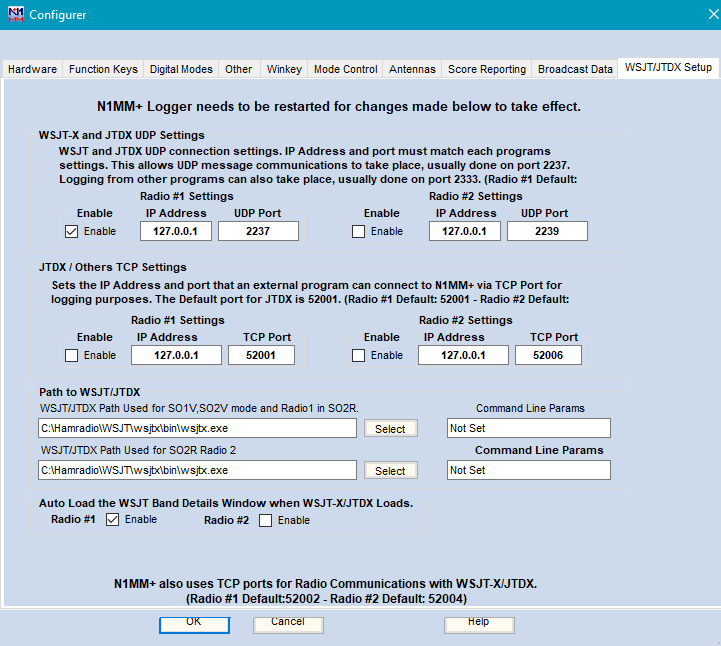
N1MM+ can receive log data from other logging programs (such as JTDX, JTAlert and WSJT-X version 1.9.0 or later) via connections on the IP address and port specified under the WSJT/JTDX Setup tab in the Configurer (the default for JTDX TCP packets is 127.0.0.1:52001, for JTAlert and WSJT-X UDP packets is 127.0.0.1:2333). There is an Enable check box that must be checked before the program will accept data on either port; you may need to shut down and restart N1MM+ after checking the Enable check box.
The data sent from the other program must be in the following format:
< command:3 > Log < parameters:nnnn > QSO data record (where “nnnn” = length of ADIF character string)
For example,
< command:3 > Log < parameters:146 > < Band:3 > 20M < Call:5 > M4HXM < Freq:6 > 14.076 < Mode:4 > JT65 < QSO_DATE:8 >20110419
< TIME_ON:6 > 184000 < RST_Rcvd:3 > -03 < RST_Sent:3 > -07 < TX_PWR:4 > 20.0 < EOR >
The QSO data will be inserted into the currently defined N1MM+ contest log.
The following ADIF field tags are supported:
“CALL”, “QSO_DATE”, “TIME_ON”, “CONTEST_ID”, “MODE”, “FREQ”, “FREQ_RX”, “BAND”, “COMMENT”, “CQZ”, “ITUZ”, “GRIDSQUARE”, “NAME”, “RST_RCVD”, “RST_SENT”, “TX_PWR”, “RX_PWR”, “SRX”, “STX”, “QTH”, “OPERATOR”, “RADIO_NR”, “POINTS”, “ARI_PROV”, “ARRL_SECT”, “DIG”, “DISTRIKT”, “DOK”, “IOTA”, “KDA”, “OBLAST”, “PFX”, “RDA”, “SAC”, “SECT”, “STATE”, “IARU_ZONE”, “SECTION”, “NAQSO_SECT”, “VE_PROV”, “UKEI”, “WWPMC”, “PRECEDENCE”, “CHECK” and “EOR”.
